Affiliate Disclosure: Some links in this article may earn us a small commission if you make a purchase, at no additional cost to you.
How Is It The Best 360Hz Gaming Monitor?
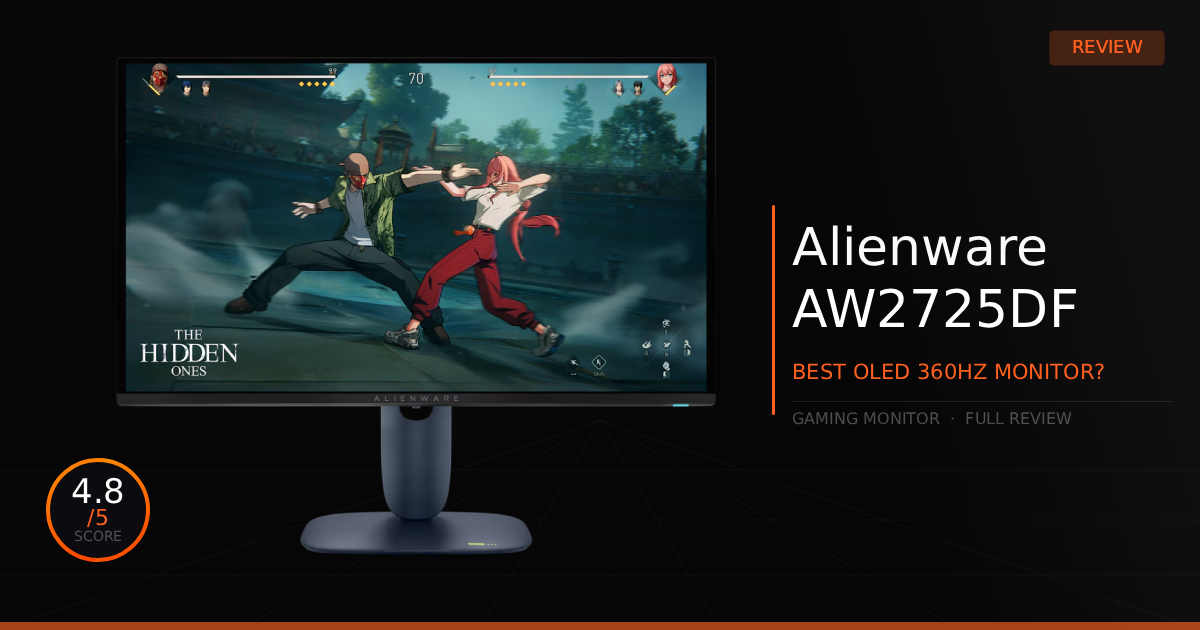
Undoubtedly the best 360Hz QD-OLED monitor on the market right now, the Alienware AW2725DF is the perfect price-to-performance 360Hz OLED display. It is ideal both for casual gaming, where you can enjoy perfectly beautiful blacks, and for competitive gaming, where it provides a massive performance advantage while still maintaining those vibrant colors. No more dull colors when you switch to this high-end gaming monitor, making it the best 360Hz display available.
GTT Quick Score: 4.8/5
Quick Verdict
The Alienware AW2725DF is undoubtedly the best 360Hz QD-OLED gaming monitor on the market, combining near-instant 0.03ms response times with perfect blacks and vibrant colors that make all games look twice as good. It is the ultimate price-to-performance upgrade for both casual and competitive players, delivering a massive, top-of-the-line motion clarity advantage without sacrificing a gorgeous, cinematic visual experience.
➔ Check Price At Amazon
➔ Check Price At Newegg
Our Summary:
This monitor stuck out to us immediately, and we just had to get our hands on it when it first released. The package delivers a QD-OLED panel with a glossy finish that provides a phenomenal, window-like viewing experience, extremely low motion blur, zero ghosting thanks to OLED's near-instant 0.03ms Gray-to-Gray response times, and the closest to a perfect HDR experience monitor technology had ever seen. It also packs a massive punch by being a 1440p 360Hz display, making it incredibly sharp for competitive gaming. More importantly, that 360Hz refresh rate actually buffs the 0.03ms response time to deliver nearly flawless raw motion clarity, all without needing to use ULMB 2.
Why This Monitor Matters For Gaming:
A monitor like this really provides a benefit for everyone. As a competitive gamer, you'll be able to track your targets much better with exceptional motion clarity, spot enemies more easily thanks to accurate colors and deep blacks, and experience a 360Hz refresh rate that allows you to see information at the exact same rate the pros do. This gives you a top-of-the-line advantage in fast-paced competitive games like Fortnite or CS2.
However, while this is absolutely a competitive-tier display, it isn't strictly advertised as just one; its true beauty shines in story-driven titles or games with beautifully in-depth worlds that allow you to admire what OLED technology can really do. Being able to explore Elden Ring's massive world and art design, or playing intensely dark horror games, allows you to take full advantage of the screen, truly seeing the game exactly how it was meant to be played. It genuinely makes all games look twice as good with a highly vibrant and color-accurate display.
Alienware AW2725DF: What Are The Specs?
Technical Specification | Alienware AW2725DF Details | Why It Matters for Gaming |
|---|---|---|
Panel Technology | Third-Gen QD-OLED Panel | Combines the infinite contrast of organic light-emitting diodes with a Quantum Dot layer. This eliminates muddy grays, delivering completely ink-black shadows and ultra-vibrant colors that pop even in heavy dark fantasy environments. |
Refresh Rate | Native 360Hz Refresh Rate (via DisplayPort) | Delivers phenomenal, top-tier fluid motion to keep fast-moving competitive tracking incredibly smooth. Essential for high-refresh-rate setups where reacting to a split-second enemy peak dictates the match. |
Response Time | Ultra-Fast 0.03ms Gray-to-Gray (GTG) | Pixel state transitions happen almost instantaneously, which completely eliminates ghosting, trailing, or motion blur without requiring artificial, artifact-inducing pixel overdrive profiles. |
Resolution & Size | 26.7-Inch QHD (2560 \times 1440) Layout | The absolute sweet spot for highly competitive PC gaming. It provides a sharp 111 Pixels Per Inch (PPI) density that makes targets highly readable without demanding the immense, frame-dropping hardware tax of a native 4K display panel. |
HDR Performance | VESA DisplayHDR True Black 400 & 1000 Nits Peak | Grants massive dynamic depth to highlights while ensuring deep, true dark levels remain natively unmeasurable on a sub-pixel level. Shadows retain deep clarity so enemies can't hide in dark corners. |
Color Accuracy | 99.3% DCI-P3 Coverage with Delta E < 2 | Factory-calibrated out of the box to professional-grade color accuracy across both sRGB and DCI-P3 spaces. Includes a dedicated Creator Mode toggle to easily clamp the color gamut, preventing over-saturation in standard titles while delivering stunning color volume for cinematic games. |
Variable Refresh Sync | AMD FreeSync Premium Pro & VESA AdaptiveSync | Natively synchronizes the panel's scan line cycles directly with your GPU's variable frame output, entirely wiping out screen tearing and panel stutter without adding frustrating V-Sync input lag. |
Physical I/O Ports | 2x DisplayPort 1.4, 1x HDMI 2.1, & USB Hub | Dual DPs allow for easy multi-system hookups at full spec, while the HDMI port supports high-performance console tracking. A quick-access USB-C downstream port sits right on the bottom chin for swift peripheral charging. |
Alienware AW2725DF: Pros & Cons

Pros
Glossy Finish: The glossy screen is a massive improvement over traditional matte screens, letting light pass through more accurately. It really helps those deep blacks and bright colors pop.
Impressive Warranty: It comes with a 3-year warranty that explicitly covers OLED burn-in. Plus, the warranty covers other damage outside of user error, such as dead pixels or arriving dead on arrival (DOA).
Colors: The highly accurate colors out of the box, combined with infinite contrast, deep true blacks, and a wide color gamut, make for bright, popping colors that look absolutely stunning in-game or when watching other media content.
Affordable: Sitting around $650 or going on sale often, making this the best budget 360Hz OLED option available.
Cons
Nvidia DLDSR: No form of DSR or DLDSR is easily possible on this monitor without dramatically lowering your refresh rate and switching to an HDMI 2.1 cable, due to Display Stream Compression (DSC).
Custom Resolutions: Because of Display Stream Compression, you cannot utilize custom stretched resolutions for competitive games without sacrificing 1440p at 360Hz if you manually turn off DSC. However, there are known workarounds using GPU scaling to get around this issue.
Alienware AW2725DF: Daily Real World Use
Here is our comparison for Alienware AW2725DF vs ASUS ROG Strix XG27ACDNG and then how well the Alienware AW2725DF does as a daily driver for gaming and daily use.
Specification | Alienware QD-OLED AW2725DF | vs. ASUS ROG Strix OLED XG27ACDNG |
|---|---|---|
Panel & Speed Spec | Powered by a 3rd-Gen 360Hz QD-OLED panel pushing a crisp 1440p resolution. Shines with an instantaneous 0.03ms pixel response time, wiping out ghosting and motion artifacts entirely without artificial pixel overdrive. | Deploys the exact same 360Hz 3rd-Gen QD-OLED glass running at 1440p with an identical 0.03ms response speed. Motion handling and pixel-level tracking responsiveness are virtually indistinguishable between the two. |
VRR & Anti-Flicker DSP | Natively handles refresh sync via AMD FreeSync Premium Pro. While it operates beautifully under steady frames, massive FPS drops can introduce standard OLED brightness-gamma flicker in deep shadow areas. | Features a hardware-level ROG OLED Anti-Flicker engine. It lets you select three different refresh rate stabilization profiles to actively dampen shadow flicker during rapid frame rate fluctuations. |
Power & Peripheral Hub | Equipped with a standard USB-B upstream hub and a quick-access USB-C downstream port on the front lip. It handles peripheral swapping easily but lacks the power or routing capabilities to act as a single-cable laptop dock. | Upgrades to an internal KVM Switch and high-draw USB-C interface. It allows you to control two separate computers using one mouse/keyboard, while pushing 90W of USB Power Delivery to fast-charge a laptop or handheld over one cable. |
Chassis Setup & Utility | Built into a sleek, minimalist dual-tone casing featuring a tiny hexagonal desk footprint. It frees up massive mousepad space for low-sens competitive flicking, but the top frame is strictly bare. | Styled with an aggressive, cyberpunk-inspired ROG aesthetic. It integrates a built-in 1/4-inch tripod socket right on top of the stand arm, letting you screw a streaming camera, microphone, or key light directly into the monitor frame. |
Aspect Ratio Scaling | Displays the image natively at full 27-inch scale. If you prefer playing on a smaller display size for closer eye-tracking, you have to manually drop resolutions and configure desktop GPU scaling wrappers. | Outfitted with native hardware Aspect Ratio Control. The monitor can instantly mask the display down to simulate a 24.5-inch screen window or a full-screen 4:3 arena with true ink-black OLED borders to ease competitive focus. |
Cooling & Thermal Layout | Relies on a passive dual-layer custom heatsink layout. It pulls heat away from the organic subpixel grid silently with zero fan noise, ensuring a fully quiet desktop space while mitigating burn-in. | Outfitted with an advanced custom passive heatsink layered with a Graphene film. This premium thermal wrap spreads heat across the chassis faster, giving the hardware excellent burn-in defenses under high brightness. |
Daily Use & Performance
As a daily monitor, it is nearly perfect. Watching movies or any general type of fun media looks fantastic. We absolutely love the perfect blacks in content, like truly not being able to see anything in the pitch black of horror movies. The monitor is only nearly perfect, though, as we do have our issues. It took us a little bit of time to get adjusted to how dim the screen is compared to traditional LED displays. We also found that running the creator sRGB profile on gamma 2.2 looked a little washed out, but this can be fixed by downloading a custom SDR sRGB-to-Gamma-2.2 color profile, which a creator made and hosted toward the bottom of his GitHub page. Additionally, while it isn't the monitor's fault, Windows and other software choices for HDR support can cause some annoying nuances when trying to seamlessly use HDR across everything. It still looks amazing, though. Then finally, keep a high-quality microfiber cloth around, using distilled water only if needed to keep the screen completely clean.
As for daily gaming on this monitor, it actually is pretty much plug-and-play after adjusting your refresh rate in your settings. We had zero issues in-game, giving us the clear, perfect visuals that we loved in titles like God of War and Elden Ring. I also play Fortnite daily on it; it is more than perfect and has genuinely helped carry me to the top of the leaderboards in Unreal rank. This monitor certainly won't be the reason you're losing.
Who Shouldn't Purchase The Alienware AW2725DF?
The Alienware AW2725DF is great, but it is not entirely perfect or for everyone; it is still an expensive OLED.
On a Budget: While affordable in the OLED department, it is genuinely still pretty expensive. We would consider all options before entirely pulling the trigger, unless you are completely okay with the purchase and your mind is already made up.
Competitive Only: You might not even care about how good the monitor actually looks—which is probably rare for most people, but technically, technologies like Nvidia ULMB 2 and G-SYNC Pulsar still provide a slight technical advantage in motion clarity for purely competitive gaming. However, if you go that route, you lose out on everything else that makes this display special, like deep blacks and vibrant colors with infinite contrast. (Honestly, we think most people, even competitive players, will enjoy the OLED more unless you are actively making money off of gaming.)
Game Tested Tech Score: 4.8/5
The Verdict
Easily a contender for being labeled the best 360Hz gaming monitor you can buy, it provides nothing but a dramatically improved visual experience in both gaming and all media consumption, thanks to its standout feature of perfect blacks. While keeping the bridge wide open for top-tier, "D1" competitive gaming, this monitor is absolutely worth the upgrade to replace your old IPS or TN panel.
Our Personal Advice
Treat the screen with care, especially while cleaning the glossy display, otherwise, you could cause deep scratches. Notably, you will see small micro-scratches over time, but those should be completely unnoticeable when the monitor is actively being used and will look perfectly fine. Trust us, we learned the hard way after accidentally not using distilled water and having to go out and buy some just to remove the mess we made.